Next Steps
What You Built
You now have a locally running data discovery portal with:
- PostgreSQL: a database to store persistent data
- Elasticsearch: indexing your tabular data with typed field mappings
- Arranger: providing a GraphQL search API and configurable UI components
- Stage: rendering a browser-based portal with faceted search, sortable tables, and data export
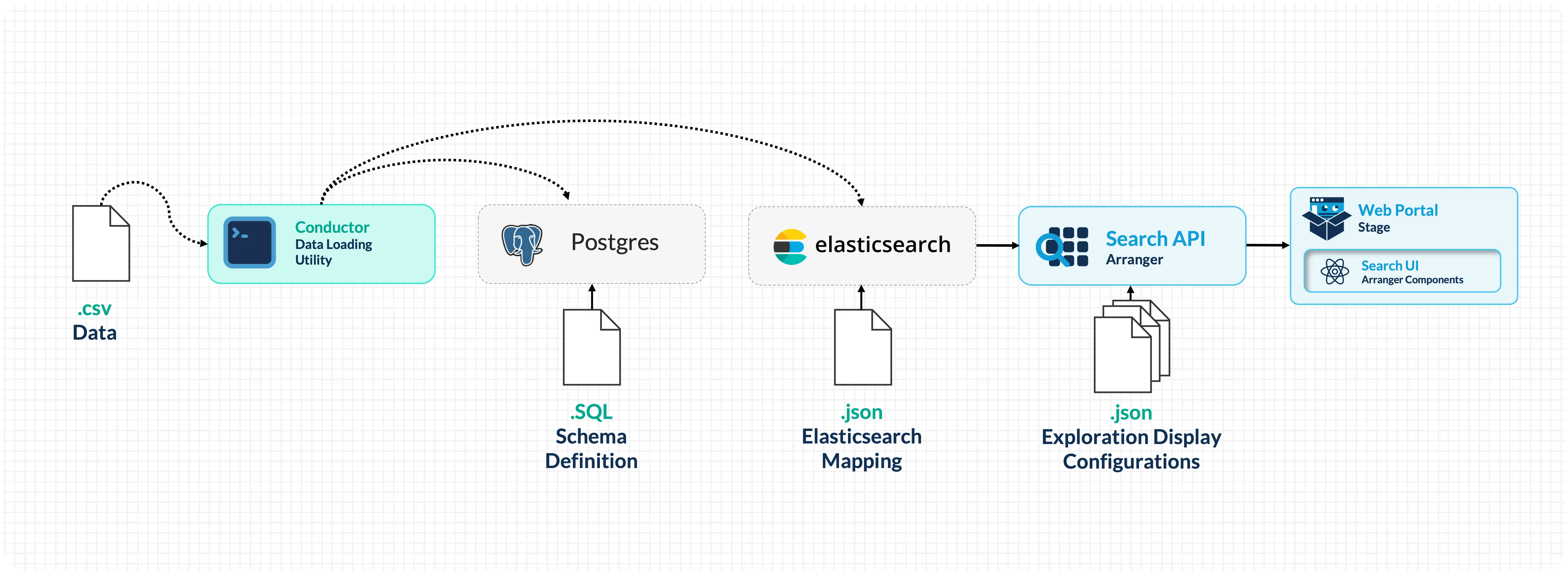
You've seen how to generate configuration files from CSV data, wire services together through Docker Compose, load data with Conductor, customize the portal's search interface and appearance, and understand the deployment architecture for making portals network-accessible.
Going Beyond Localhost
The portal you've built runs entirely on your laptop and is only reachable at localhost. This is intentional for the workshop; it keeps the setup self-contained and requires no external infrastructure. However, a laptop is not a suitable host for a live web service. Laptops are not always on, and a portal goes offline whenever yours does.
Making the portal accessible to collaborators or the public requires dedicated infrastructure:
- A server with a public IP: a cloud VM (AWS EC2, Google Cloud, Azure), a university-managed server, or a VPS from a hosting provider.
- A domain name and DNS records pointing that domain to your server's IP.
- A reverse proxy (such as Nginx) to route web traffic on standard ports (80/443) to the right services and terminate SSL.
- TLS certificates for HTTPS: Let's Encrypt provides these free of charge via Certbot.
Setting up and maintaining this infrastructure typically requires a system administrator, your institution's IT or research computing team, or a cloud engineer familiar with your organisation's infrastructure. If you are exploring what a production deployment would look like for your research group, reach out to the Overture team at contact@overture.bio; we're happy to help scope what's needed.
Expanding the Platform
The search and exploration stack used in this workshop is part of the broader Overture platform. Depending on your needs, you can extend it with:
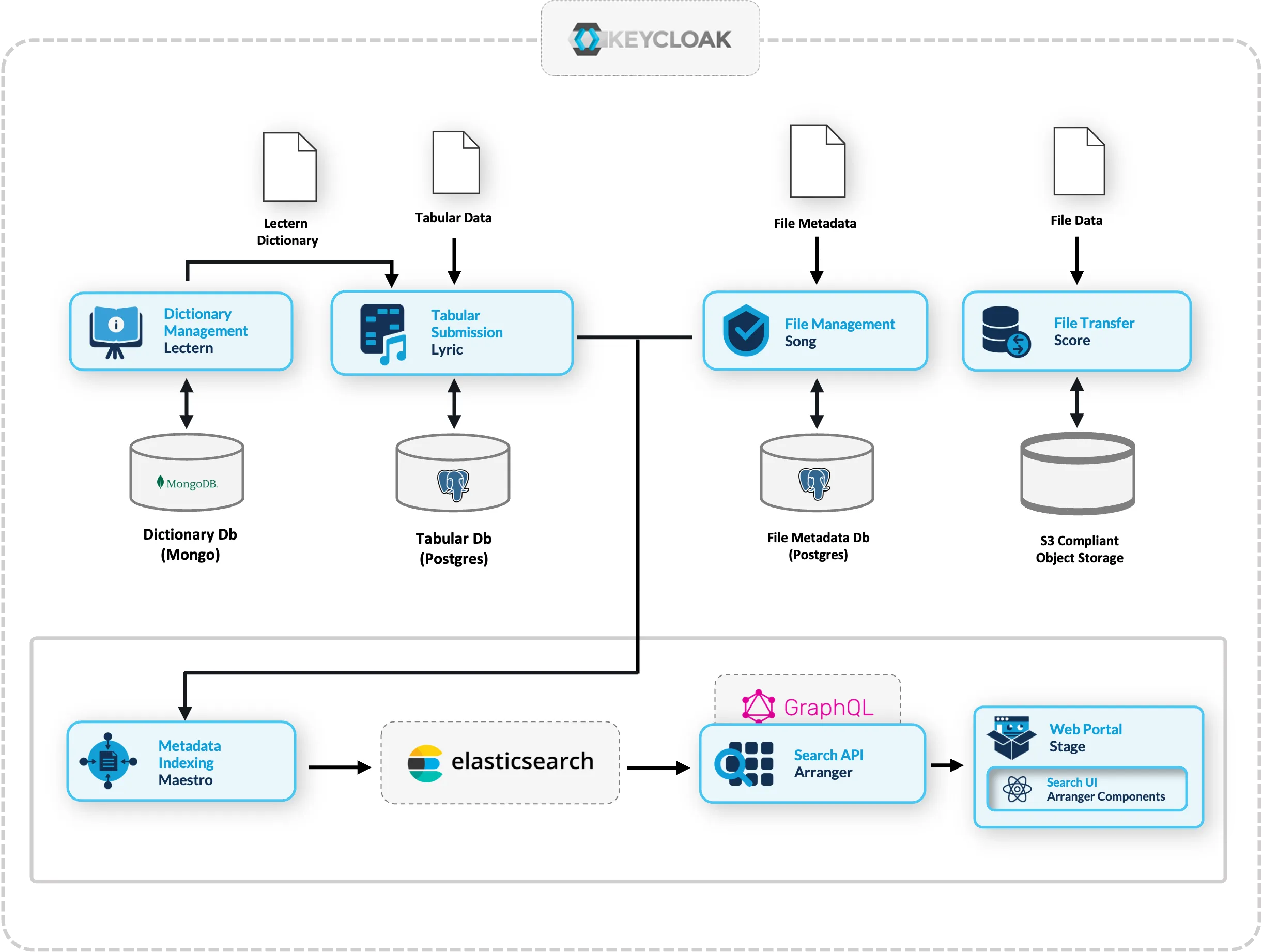
| Need | Overture Service | What It Does |
|---|---|---|
| Enforce data schemas | Lectern | Define and manage data dictionaries that validate submissions |
| Accept tabular submissions | Lyric | Structured data submission with validation against Lectern schemas |
| Manage file metadata | Song | Track and validate files with analysis schemas |
| Store and transfer files | Score | Object storage integration (S3, Azure Blob, etc.) |
| Automate indexing | Maestro | Event-driven indexing from Song/Lyric into Elasticsearch |
These services compose together, letting you build from a simple search portal to a full data management platform incrementally. For more information, see the Overture documentation.
Conversational Data Discovery
One of the most compelling reasons to structure your data through Arranger is that it makes your data machine-accessible in a way that modern AI tooling can reason over. We are actively updating our search API so it can be consumed by a language model, enabling researchers to query and retrieve data in plain language.
This capability is currently in active development by the Overture team. It is not part of this workshop, but it is a direct and natural extension of the infrastructure you are building here.
In addition to this our team is building a Conversational Data Discovery (CDD) platform: an interactive research environment that connects a self-hosted LLM to Overture datasets and beyond. Because Arranger exposes a live description of your data, including field names, types, value distributions, and catalogue structure, a language model is capable of:
- Understanding what data is available without being hardcoded to a specific schema.
- Translating natural language questions into validated queries. A researcher asks "how many samples have a TP53 mutation?" and the model constructs the correct filter against your specific field names.
- Grounding its responses in your actual data rather than hallucinating field names or value ranges, it reads the schema before generating any query.
- Executing analysis code in a sandboxed workspace. Once a query is confirmed, the model can generate Python to analyse and visualize results, running it in an isolated container where the researcher approves every step.
Why self-hosted models: Research data is often sensitive. Routing queries through commercial AI providers is not viable for many research contexts. The CDD platform can be used to run capable models, adjacent to the data, with full control over the stack.
Get in Touch
Whether you're adapting the platform to your own data, running into issues after the workshop, or exploring what a larger deployment might look like for your research group, we're happy to help. Reach out to the Overture team directly at contact@overture.bio.
Post-Workshop Survey
If you have a few minutes, we'd appreciate your feedback on the workshop. Your responses help us improve the content, pacing, and hands-on exercises for future sessions.
Fill in the post-workshop survey →
Resources
- Overture Documentation: docs.overture.bio
- Overture GitHub: github.com/overture-stack
- Arranger Docs: Arranger overview
- Stage Docs: Stage overview
- Elasticsearch 7.17 Reference: elastic.co/guide
- Support Forum: GitHub Discussions